Python Threat Intel Tool
Let’s do it again but in Python! - 29/05/26#
If you’ve scrolled slightly down on this list of blog posts you’ll see that this is almost a direct mirror of the project that I completed in December but with a shift of language. The first application was created using Javascript with Electron and whilst it was a valuable learning experience which helped me with my dissertation research artefact, I felt that it was not as beneficial as getting more practice with python. So late at night a few days ago I made the decision that I would recreate it using python and really do my best to work through any hiccups that appeared. When first looking up a GUI that I could use for the development of this tool I clicked one of the top links that appeared which was PySimpleGUI. As described on their site, “it is a wrapper for tkinter (and other GUI libraries) that transforms the GUI SDK into a simpler, more compact architecture while still providing detailed customisation” which fit the requirements for my project.
I initially started with following a write-up that was written by Mark Driscoll to get to grips with the basics of this and followed their walkthrough to create a basic image viewer.
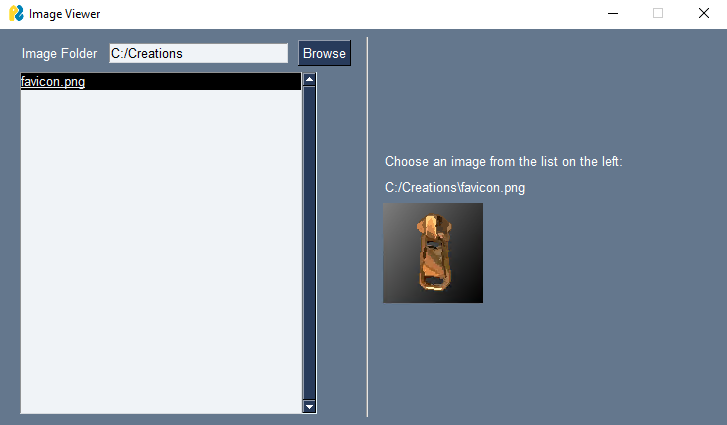 The image viewer
The library focuses on creating a window in which you are able to customise the layout, size and more of certain elements to have your GUI displayed exactly as you would like. This window is then looped using an event loop in which values and events are read from user interaction. Events will have a key string to identify which element the user has interacted with with a value variable matching the key to a value. Conditional statements are then used to dictate what happens within the application until the user either closes the window or exits to break the event loop. This initial bit of work and write-up helped to create the base layout for the app and this was edited to create the final product.
#Example URL column syntax
URL_column = [
	[
		sg.Text("URL Checker"),
		sg.In(size=(25,1), enable_events = True, key="-URL-"),
		sg.Button("Submit",tooltip="Please enter a URL", key="-URLBUTTON-")
	],
	[
		sg.Multiline("",size=(60,15), key="-OUTPUT2-", disabled=True, autoscroll=True)
	],
]
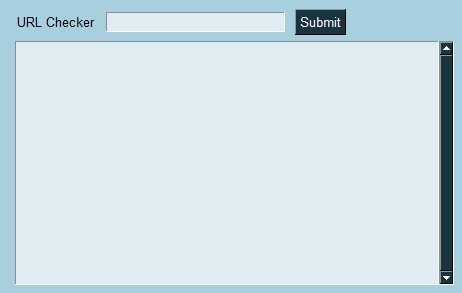 What it looked like in practice
During the creation, despite it being a small project with just myself contributing, I decided to utilise source control through GitHub just on the off chance that I botched it at some point and needed to do a revert to last working point. As part of it I worked with Visual Studio rather than cursor to try and mix up the IDE that I use and avoided using AI for any of my problem solving to keep it to a nice traditional brain teaser. I usually work within just a sublime text editor when I’m writing any Python as it’s usually just small script work rather than something with a little extra meat, so the full IDE experience was a nice change of pace to have that extra functionality.
Once I had a layout I was happy with, which I have to admit took a lot longer than I’d care to elaborate on, I was able to begin looking up the VirusTotal integrations with Python. I fully expected that I would be creating full REST calls to pull the information that I was looking for but was happily proven wrong when I found the documentation for vt-py. The lovely individuals at VirusTotal had done all of the heavy lifting for this one meaning all that I had to do was install a handy python library built for using the VirusTotal API. As I am just doing this for personal projects I’m using the freemium tier of access to the API meaning that I’m limited on the calls and functionality that I have access to but this suited me as I still was able to get information on files and URLs that I submitted.
To do this it was a simple couple lines of code to pull the information that I wanted about a file once I’d created a client using my API key:
import vt

client = vt.Client("<Put your API Key here :)>")
#Now that we have the client created we can make calls to the endpoints
#we need to get the information that we want

#Like to get information on a file using it's file hash:
file = client.get_object("/files/SHA256-SHA-1-OR-MD5-HASH-HERE")
And you could do similar with the URL information endpoint but it required a little extra code as then you need to generate an identifier from the url before you can pull the information:
import vt

client = vt.Client("<Put your API Key here :)>")

#To get information on a url we first need the ID:
url_id = vt.url_id("www.day-dz.uk")
#Then make the call to the API endpoint to get the information using the ID we just got:
url = client.get_object("/urls/"+url_id)
Once I had got these in place and had solved some of the oddities around how the values and keys worked with the inputs and adding them to these calls I was getting output around the items that I was searching for. Compared to the Javascript version of this, it was way less painful and dare I say actually enjoyable at some points. Then I decided that I wanted to make the output a little nicer and that was where I spent the majority of the time to make sure that again it looked just right to me as initially the output looked like this:
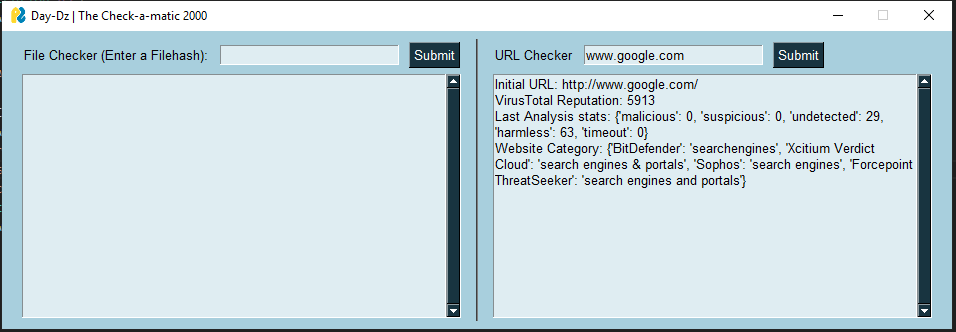 How gross is that output?
This meant that it was time to spend time re-learning how to interact with dictionaries in python as I’d lived in the happy world of PowerShell objects for long enough. This spawned another 6 functions that were purely for taking the information that was retrieved through the API calls and beautifying them until they looked a lot more presentable in my little output box. I also added in logic to make a verdict on whether the file was deemed clean, suspicious or malicious using my own judgement from the results that were provided. All of this came together to make the final-ish product that I’ll include below in a screenshot and in the showcase section in the form of links to the repo for this:
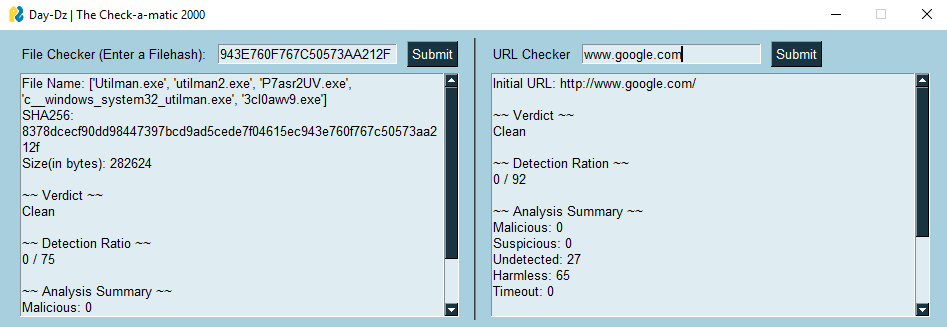 This was a fun one that I wanted to knock out to get me back in the swing of things after completing my Masters in it’s entirety. I got confirmation from my marker and supervisor that I have passed my dissertation but I’m still waiting on a final grade which they said I’d get in June fingers crossed. I’ve taken a little time to recover from all of the work I did for that in which I’ve been playing a of Runescape but I’m ready to get back on the wagon and start maintaining this more frequently. Over the next few months I’ll be hoping to get some certification work progressing at work and at home to progress myself a little more. I’ll also hopefully be working on some lab exercises on learning platforms as well as doing some home lab stuff that I’ll make some blog posts on in the future too.
I’ll probably come back to this project again to add more functionality to it once I have some ideas but for the time being I’m happy with it’s current state. Keep an eye out for more posts and I’ll catch you next time!
Jack :)